Learning Back-End Stack and Architecture by Building a User Analytics platform
Learning Back-End Stack and Architecture by Building a User Analytics platform
By Othniel Visky
11 min read
A front-end developer learns NestJS, MongoDB, and Kafka by building a full-stack user analytics platform in a TypeScript monorepo.
- Authors

- Name
- Othniel Visky
I've been a front-end developer for almost 12 years. I've always had an interest in getting more hands-on experience with back-end stacks and tools, but so far I've only had the chance to "help out" when actual back-end developers had too much on their plates. I worked this way with .NET, FastAPI, Bun, and Hono, but even so, my perspective was always from the front-end. I wasn't aware of the detail and nuance involved in developing server applications and working with databases, and I lacked real experience.
Then an opportunity came along: I had the chance to interview for a back-end position where the main stack is NestJS, MongoDB and Kafka. I immediately got excited and started flipping through the documentation of these tools. Asking my trusty AI agent what this stack could be used for, I landed on the idea of creating a user analytics platform, similar to Google Analytics or PostHog.
Before starting to write any code, I formed a loose structure of the architecture that I wanted to follow. I knew that I needed a server-side application that would take care of the "heavy lifting" – business logic calculations and saving to and querying the database. I wanted my API to be separate from the core app. This split maps perfectly to how Kafka is intended to be used: with a clear separation between the event producer and the event consumer. In my architecture, the API acts as the trusted entry point for analytics events originating from the client. This API pushes these events onto Kafka topics, but it doesn’t concern itself with storage or business logic. Meanwhile, a separate core application consumes from the Kafka stream, performing aggregations, enrichment, and persistence into MongoDB. This decoupling means the ingestion layer can stay lightweight and responsive, while the heavy-lifting logic can operate independently and scale on its own terms. Then, I also needed a way to make my analytics API "consumable". For this, I've decided to create an SDK. When exposing analytics to clients, there’s always a choice between a simple embedded script (like a small JavaScript snippet users drop in their site) and a full-featured SDK. A script is easier to integrate and get started with but offers little in terms of customization or type safety. An SDK, on the other hand, lets me offer a strongly typed, well-documented interface for sending events. It gives client developers code completion, validation through types, and means I can ship updates or fixes through npm. Finally, I knew that I needed two front-end applications: one would be a "tester UI", which would be responsible for tracking user actions by sending custom events to the back-end via the SDK; and one dashboard application where I would show the results of data aggregation.
Just for a simple user analytics app, I need to create five separate apps. I like this approach because it clearly separates responsibilities, making my system much easier to maintain, and when (not if (wink, wink)) I break into the market with this app, it'll also be much easier to scale. Because of this, I chose to set up a monorepo. Since I was going to use NestJS, there was no doubt in my mind that I wanted the code across the entire stack to be written in TypeScript, so for the monorepo management tool, I've chosen Turborepo. Using a monorepo is all about managing complexity as the project grows. With everything—from back-end services to front-end apps and shared packages—living in one repository, I get a single source of truth for dependency management, type definitions, and shared utilities. This also helps keep cross-project changes in sync. It does introduce some operational overhead (especially for CI/CD), but Turborepo’s caching and smart build system take a lot of that pain away. Ultimately, a monorepo is an investment in long-term maintainability, which pays off as the system scales and more features get added. Most importantly, it lets me respect one of the most fundamental software development principles, namely "single responsibility".
user-analytics-monorepo
  apps
      analytics-api
      analytics-core
      analytics-dashboard
      tester-ui
  packages
      eslint-config
      typescript-config
      analytics-sdk
This is the folder structure after creating all the apps.
analytics-core is a server-side app that is the heart of the platform. It uses all three main tools of the stack: MongoDB, Kafka, and NestJS. Data coming from the API ends up here for storage, retrieval, and processing. analytics-api is a NestJS RESTful API app. Its main responsibility is delegating the work to the core application via Kafka messages. Currently, it does this for both the inbound (receiving events from the SDK) and outbound (serving analytics metrics back to the dashboard) directions. Basically, it only acts as a thin routing layer. As the app grows, it will make sense to split the API by applying the CQRS (Command Query Responsibility Segregation) pattern, separating the command side (capturing events, or write) from the query side (serving metrics, or read). analytics-sdk is the npm package. It exposes a capture function used for sending custom events from a client application to the API, which then sends them to the core app. tester-ui and analytics-dashboard are both Next.js applications. The former tracks user actions by capturing custom events. The latter is a dashboard for showing the captured and processed data to users of the platform.
I truly had a lot of fun setting all of this up. As I started to write the components, classes, and functions used in various flows within the platform, I would always look up concepts and ways of correctly doing things in the documentation of these tools. I also used an AI agent when I needed to find a piece of information about an aspect of these tools on which I got stuck. But I'd always double-check the answer by comparing it to the official documentation. Double-checking myself this way also helped retain all the information I came across during this learning exercise.
I'll summarize what I learned about:
MongoDB
MongoDB is a NoSQL, document-oriented database designed to store and manage large volumes of semi-structured data. Unlike traditional relational databases that organize data in tables, MongoDB uses documents, which are JSON-like objects – it actually uses BSON, which stands for "Binary-JSON" and is a more efficient JSON developed specifically for the needs of MongoDB. The primary abstraction is the "collection," which is a group of documents analogous to a table in relational databases, but with no fixed schema, allowing each document to have a unique structure. The boundaries provided by collections in MongoDB represent logical groupings of closely related entities, similar conceptually to how aggregates are defined in Domain-Driven Design—you manage consistency rules and boundaries at the collection level. This document-based structure is a natural fit for handling clickstreams and event-based analytic data. Each user interaction—whether it's a page view, a button click, or a form submission—can vary in structure and context. At retrieval, I can use Mongo's aggregate function to query the data and filter, transform, or group it according to my needs. This function became essential for calculating the analytics metrics I wanted to show in my custom dashboard.
Kafka
Kafka is a distributed event streaming platform designed for building real-time data pipelines and streaming applications. It acts as a high-throughput, low-latency platform for handling large volumes of events or messages in a fault-tolerant manner. Kafka decouples producers and consumers, allowing data to be published and processed asynchronously and at scale. The core abstraction in Kafka is the "topic," which is a channel to which producers send records and from which consumers read. Topics are partitioned for scalability and distributed across a cluster of brokers for fault tolerance.
In my case, I used Kafka to decouple my data producer (the client app sending user events) from my consumer (the back-end processes in analytics-core that store and aggregate analytics data). By ingesting the clickstream data through Kafka, I can queue, buffer, and replay events without fear of losing anything to spikes or system hiccups. It also enables horizontal scaling: if I someday need to add more processing capacity, I can simply add more consumers. And since Kafka persists events, it's possible to reprocess historical data for new types of aggregations or analyses—something that's hugely beneficial for analytics platforms.
NestJS
Nest provides a level of abstraction over Node.js frameworks like Express or Fastify. It also provides an out-of-the-box architecture, which is heavily influenced by Angular and lets developers create "highly testable, scalable, loosely coupled, and easily maintainable applications" (NestJS docs). I created my first NestJS app by using their CLI package, leaving all the defaults in place. This way, I got a "hello world" app that defined the main building blocks of the framework: the main.ts file calling a bootstrap function, a module, a controller, and a service. The bootstrap function is responsible for running the local server, bootstrapping the entry-point-module of the app. A module provides the main way for grouping related "things" together, like controllers and services. Just like MongoDB, it draws from Domain-Driven Design concepts. Modules, just like aggregates, represent boundaries within the app's structure and group-related entities, such as the before-mentioned controllers and services. Controllers are used for handling incoming HTTP requests and returning responses. They keep the app's interface separate from actual business logic by delegating the processing of incoming data to services. Services, also called providers, are responsible for the processing of data. For doing this, they connect to the persistence layer. They contain the business logic in the form of composable and reusable operations. NestJS also provides other common functionality like middleware and interceptors, exception filters for error handling, and guards for access decisions and permissions, among others. All of these parts come together with the help of dependency injection realized through the usage of TypeScript decorators.
Analytics
The analytics engine of this project focuses on three primary metrics: page views, time on page (dwell time), and unique sessions. These represent the very basics of user analytics. Page Views are tracked by grouping events by their pathname using MongoDB aggregations. Time on Page is calculated by measuring the duration between the separate page-enter and page-leave events, which are linked by a unique pageTransitionId generated for each route change. At the time of aggregation, this property can identify the two events belonging to the same page transition.
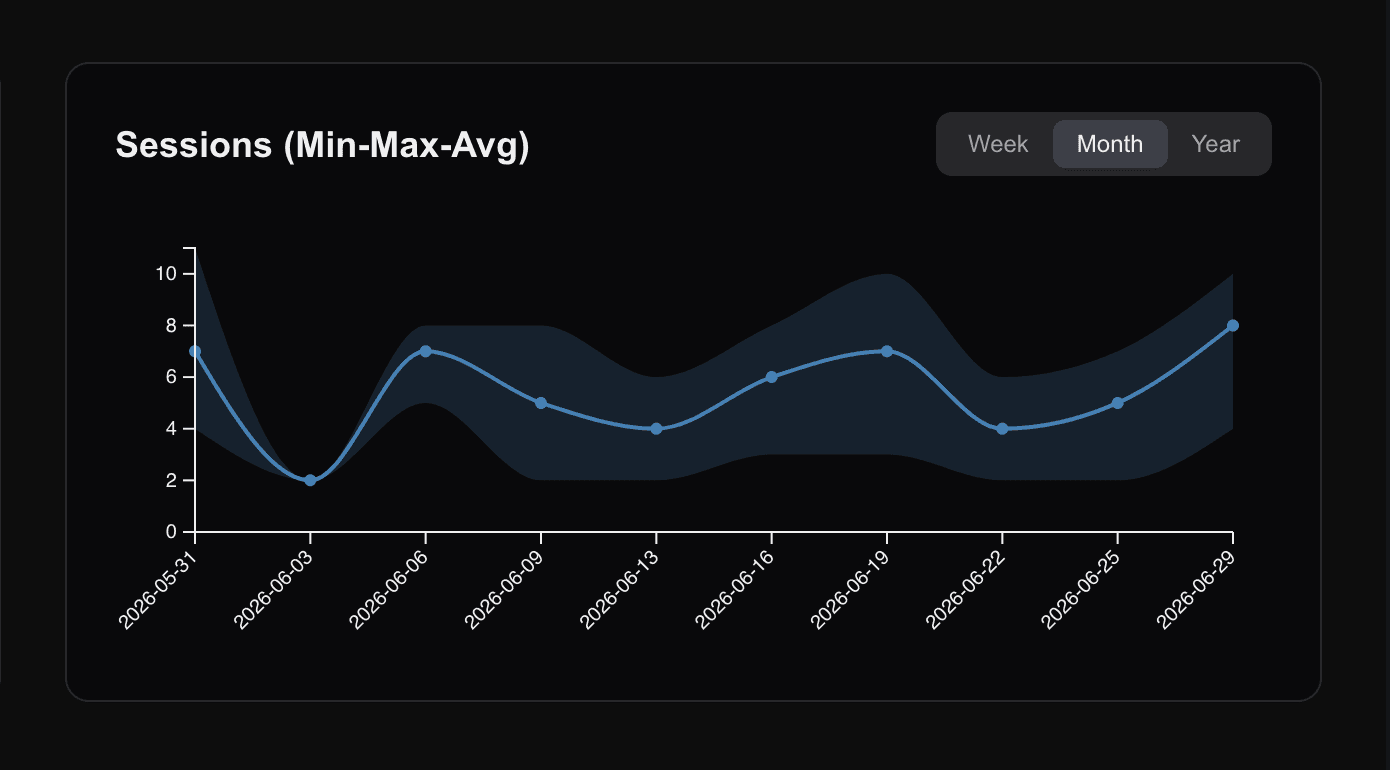
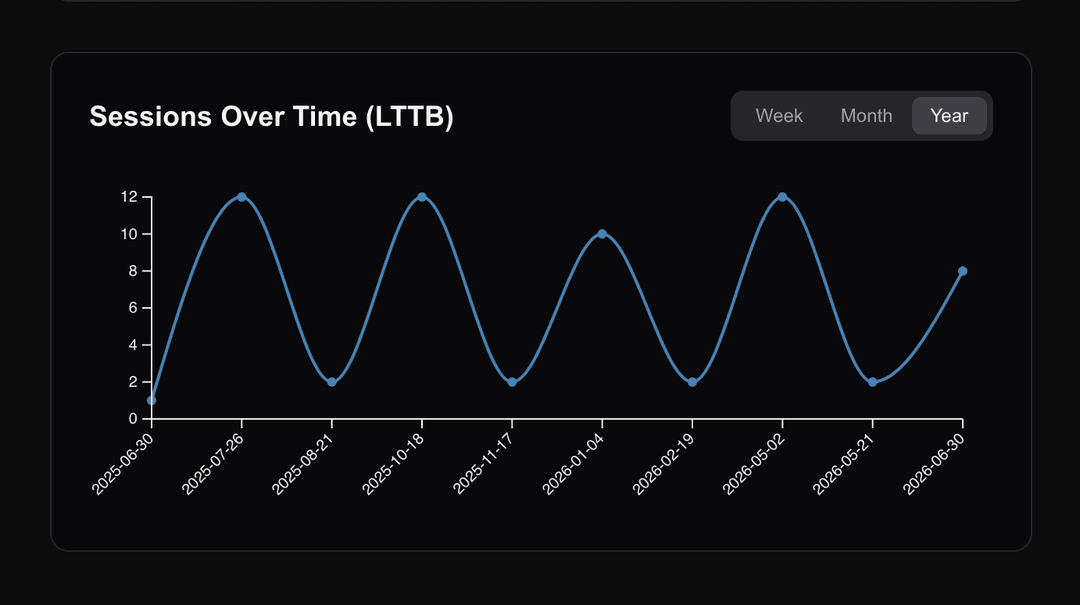
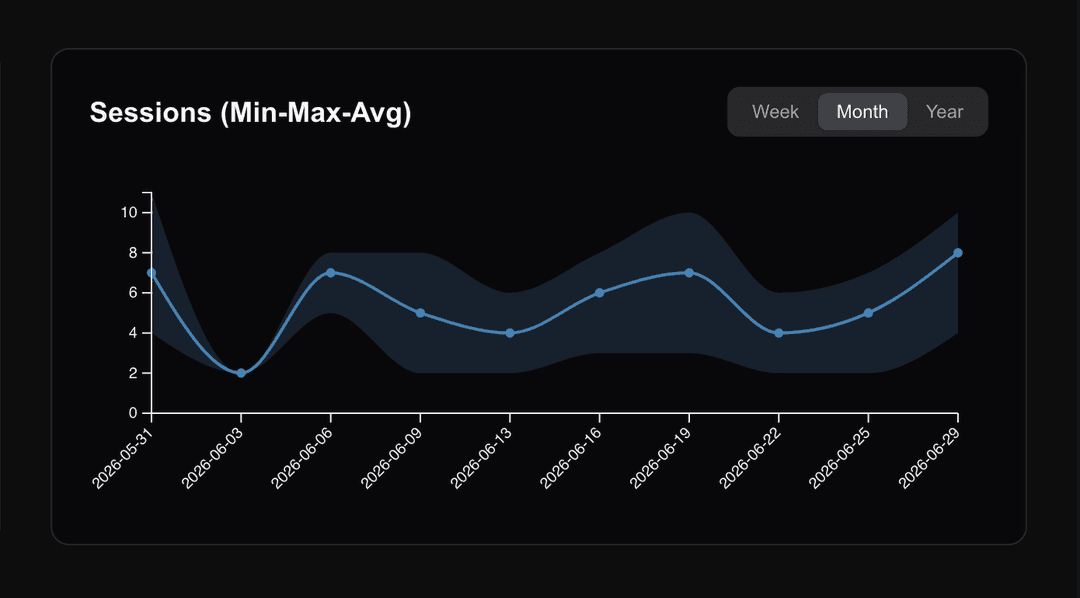
For calculating unique sessions, I've used two different algorithms: LTTB (Largest-Triangle-Three-Buckets) and Min-Max-Average, both being industry standards for downsampling large numbers of data points. These are needed to pick only a few data points from a large set. For example, if I wanted to show unique sessions over the period of a year, or even a month, it wouldn't be feasible to show the values for each day, because the data wouldn't fit nicely on the graph in my dashboard app. Instead, we want to pick representative days and only show a few while preserving the visual characteristics of the data. Both algorithms are a way of deciding which days to pick and averaging their values. LTTB, for example, does this by dividing data into three buckets and selecting data points that form a triangle with the largest area. This ensures that visually important points, like peaks and valleys, are retained in the downsampled data set.
Conclusion
Even this straightforward analytics project allowed me to learn a lot about the presented stack, and yes, I got the job!
If I were to continue with this project, I'd want to explore further metrics, algorithms, and ways to digest data in the form of click streams coming from a client. For example, I haven't even scratched the surface of what is possible with Kafka. The same can be said for the metrics calculation: next, I'd love to set up sessions, anonymous and identified users in such a way that I can create cohort retention graphs, user journey playbacks, and "predictive" insights. I was also happy to see this stack naturally lending itself to working with Domain-Driven Design principles. It would be great to refine the underlying model of the platform as it grows according to these principles.